0 Followed
0 Follower

0Lag
Uye

Aug 19, 2025

6 Mesaj

1 Reaction

0 Solution

3

First Message

No reward!

No reward!

No reward!

No reward!
- Joined
- Aug 19, 2025
- Messages
- 6
- Reaction score
- 1
- Points
- 3
- Location
- Turkey
- Website
- 0lag.tebex.io
- Credits
- 101
Link hidden for visitors. To see,
Log in or register now.
Link hidden for visitors. To see,
Log in or register now.
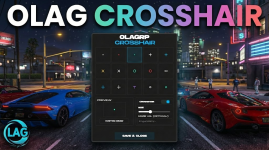
🎯 0LAG Crosshair System: Redefine Your Precision
The most advanced, standalone aiming solution for FiveM.Stop relying on external software or third-party overlays. The 0LAG Crosshair System provides a fully integrated, high-performance UI that gives your players complete control over their accuracy. Built with a sleek "Monument Extended" aesthetic and optimized for zero latency, this resource is designed to blend seamlessly into any modern server environment.
🌟 Key Features
🎨 In-Game Pixel Editor (Draw Mode)
Why settle for generic designs? Our exclusive Custom Draw Mode puts a 32x32 pixel canvas directly into the player's hands.- Full Creative Control: Draw your unique crosshair pixel-by-pixel inside the game.
- Complete Toolkit: Includes a Pen, Eraser, Clear Canvas, and a dynamic RGB Color Picker.
- Instant Application: Draw it, save it, and use it immediately.
🖼️ Limitless Customization
- 15+ Professional Presets: Includes tactical dots, crosses, T-shapes, circles, and brackets.
- External Image Support: Have a favorite crosshair? Simply paste an image URL (Imgur, Discord, etc.), and the system renders it instantly.
- Precision Scaling: A responsive slider allows players to adjust the size from 10px to 100px, ensuring perfect visibility on any resolution.
⚡ Intelligent Performance (0LAG)
True to its name, this system is optimized for maximum frame rates.- Zero Resmon: Optimized loops ensure the script runs at 0.00ms when idle.
- Smart Visibility: The crosshair automatically hides when the player opens the Pause Menu or interacts with NUI elements (inventory, phone, etc.).
- KVP Persistence: Using the native Key-Value Pair system, players only need to set their crosshair once. It saves locally and auto-loads every time they join the server.
🛠️ Server-Side Configuration
We’ve made it easy for server owners to brand the experience.- Custom Branding: Change the Server Name displayed in the UI directly via the config.
- Theme Integration: Adjust the Main Color (HEX) to match your server’s HUD or branding identity.
- Localization: Fully translated and ready to go with built-in support for English (EN) and Turkish (TR).
📋 Technical Specifications
- Framework: Standalone (Works with ESX, QBCore, or No Framework).
- UI Stack: HTML5, CSS3, Vanilla JS (No heavy libraries like Vue/React).
- Saving: Native SetResourceKvp (No database required).
- Resmon: 0.00ms (Idle) / 0.01ms (Active).
🚀 How to Use
- Type /crosshair to open the modern UI panel.
- Select a preset, paste a URL, or draw your own design.
- Adjust the size and color to your liking.
- Click SAVE & CLOSE—your settings are now permanent