Script Free FPS Optimization Tool [STANDALONE]

0 Tracked
1 Follower

F5 Studio

Uye

Mar 21, 2026

4 Mesaj

17 Reaction

0 Solution

3

First Message

No reward!

No reward!

No reward!

No reward!

Joined
Mar 21, 2026
Messages
4
Reaction score
17
Points
3
Location
Los Santos
Credits
58


Preview:


Hey everyone!
:waving_hand:

Dropping F5 Boost - a free, open-source FPS optimization tool with a full NUI menu. Players open it up, tweak their settings, and the game runs better. That’s it.

We noticed people were selling scripts like this, so we figured we’d just put it out there for free. It’s a simple concept done right, no reason to charge for it.

We wanted something that looks good and actually works, not a random list of natives slapped into a config file.
So we built a proper interface around it.

What’s in it?​

:control_knobs:
NUI Settings Menu​

Press F7 and you get a clean, draggable panel with four tabs. Presets, quality sliders, toggles, and profiles.
Everything updates in real time and saves automatically.
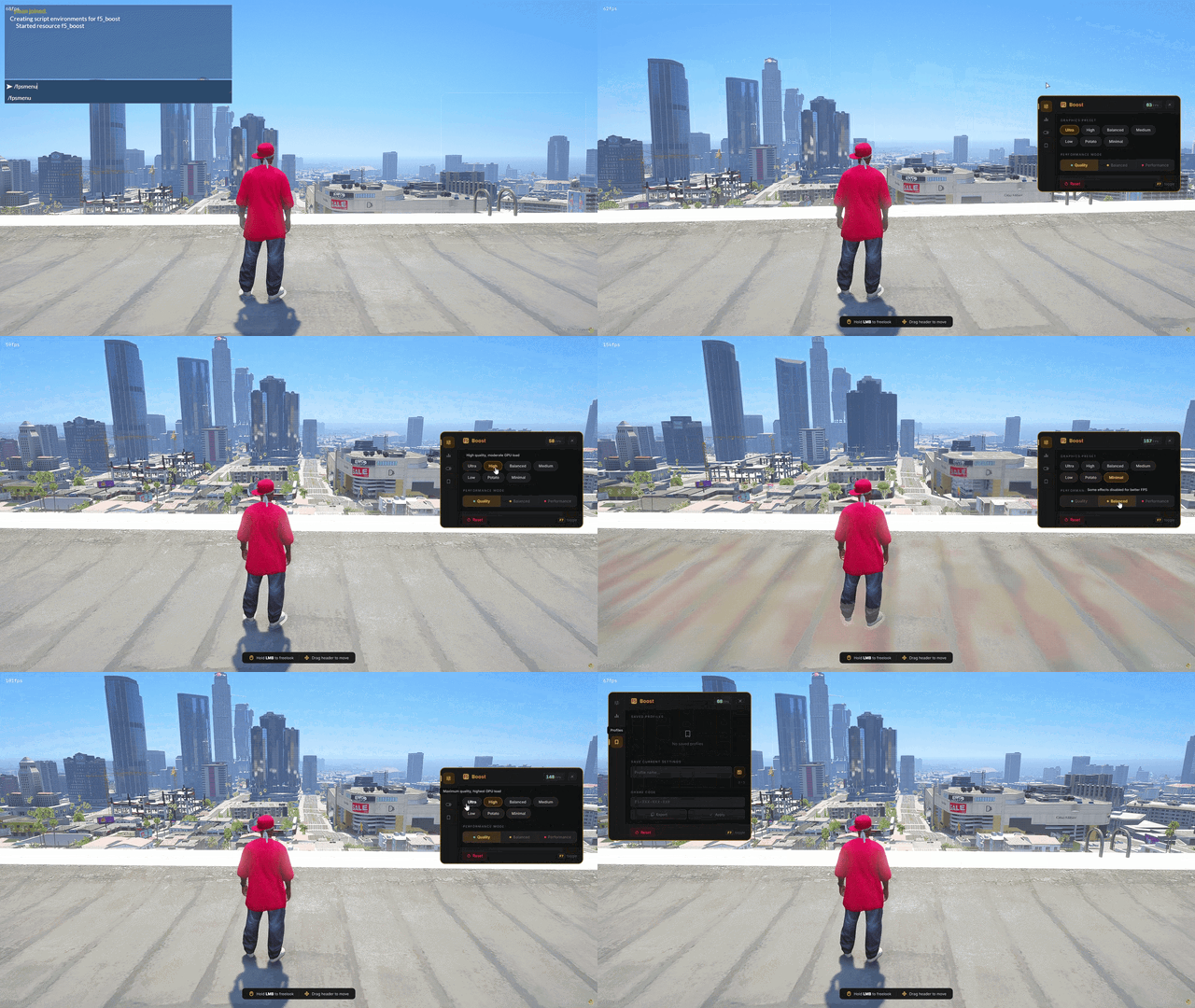


NUI OVERVIEW


:high_voltage:
7 Graphics Presets​

Ultra down to Minimal. One click and it sets shadows, objects, characters, and vehicle density all at once. For people who just want “make it run better” without touching 10 sliders.


:level_slider:
Quality Sliders​

Four sliders from 0% to 100%: shadows, objects, characters, and vehicles. Each one controls different engine natives like cascade shadows, LOD scaling, ped density, and vehicle draw distance. Fine-tune it exactly how you want.


:counterclockwise_arrows_button:
Performance Modes​

Three modes that flip all the toggles at once. Quality keeps everything on, Balanced is a middle ground,
Performance turns off everything it can for max FPS.

:floppy_disk:
Profiles & Share Codes​

Save up to 5 profiles per player in the database. Load, overwrite, delete, or set one as default for new players.
You can also export your settings as a share code like F5-A7K-M3P-X9Q and give it to someone else. They paste it, click apply, done.


:wrench:
What it actually optimizes​

Cascade shadows, ped and vehicle density, LOD scaling, model budgets, decal rendering, rain and wind suppression, fire cleanup, ambient scenarios, dispatch services, and more. Per-frame natives where needed, slow tick cleanup every 5 seconds for the heavy stuff.

:globe_showing_europe_africa:
13 Languages​

English, Polish, German, Spanish, French, Italian, Portuguese, Dutch, Czech, Turkish, Arabic, Thai, Chinese.
Everything in the menu and all notifications are fully translated.

:electric_plug:
Standalone​

No framework needed. Works on any server. Auto-detects your MySQL resource (oxmysql, mysql-async, or ghmattimysql) for the profile system. Identifies players by Rockstar license.

:package:
GitHub:

:open_book:
Docs:

The docs cover everything: installation, config reference, how each native works, the share code encoding, database schema, and troubleshooting.


Found a bug or got an idea? Open an issue on GitHub or hit us up on Discord. We’re actively working on this.

If you like it, drop a
:star:
on the repo and
:heart:
under the post.

Open source and free forever. Made by .
 
Last edited:

vovim

Uye

Apr 4, 2026

3 Mesaj

0 Reaction

0 Solution

1

First Message

No reward!

No reward!

No reward!

No reward!

Joined
Apr 4, 2026
Messages
3
Reaction score
0
Points
1
Location
angola
Credits
5

Aug 5, 2025

3 Mesaj

2 Reaction

0 Solution

3

First Message

No reward!

No reward!

No reward!

No reward!

Joined
Aug 5, 2025
Messages
3
Reaction score
2
Points
3
Location
italy
Credits
22


Preview:


Hey everyone!
:waving_hand:

Dropping F5 Boost - a free, open-source FPS optimization tool with a full NUI menu. Players open it up, tweak their settings, and the game runs better. That’s it.

We noticed people were selling scripts like this, so we figured we’d just put it out there for free. It’s a simple concept done right, no reason to charge for it.

We wanted something that looks good and actually works, not a random list of natives slapped into a config file.
So we built a proper interface around it.


:control_knobs:
NUI Settings Menu​

Press F7 and you get a clean, draggable panel with four tabs. Presets, quality sliders, toggles, and profiles.
Everything updates in real time and saves automatically.


NUI OVERVIEW


:high_voltage:
7 Graphics Presets​

Ultra down to Minimal. One click and it sets shadows, objects, characters, and vehicle density all at once. For people who just want “make it run better” without touching 10 sliders.


:level_slider:
Quality Sliders​

Four sliders from 0% to 100%: shadows, objects, characters, and vehicles. Each one controls different engine natives like cascade shadows, LOD scaling, ped density, and vehicle draw distance. Fine-tune it exactly how you want.


:counterclockwise_arrows_button:
Performance Modes​

Three modes that flip all the toggles at once. Quality keeps everything on, Balanced is a middle ground,
Performance turns off everything it can for max FPS.

:floppy_disk:
Profiles & Share Codes​

Save up to 5 profiles per player in the database. Load, overwrite, delete, or set one as default for new players.
You can also export your settings as a share code like F5-A7K-M3P-X9Q and give it to someone else. They paste it, click apply, done.


:wrench:
What it actually optimizes​

Cascade shadows, ped and vehicle density, LOD scaling, model budgets, decal rendering, rain and wind suppression, fire cleanup, ambient scenarios, dispatch services, and more. Per-frame natives where needed, slow tick cleanup every 5 seconds for the heavy stuff.

:globe_showing_europe_africa:
13 Languages​

English, Polish, German, Spanish, French, Italian, Portuguese, Dutch, Czech, Turkish, Arabic, Thai, Chinese.
Everything in the menu and all notifications are fully translated.

:electric_plug:
Standalone​

No framework needed. Works on any server. Auto-detects your MySQL resource (oxmysql, mysql-async, or ghmattimysql) for the profile system. Identifies players by Rockstar license.


:package:
GitHub:

:open_book:
Docs:

The docs cover everything: installation, config reference, how each native works, the share code encoding, database schema, and troubleshooting.


Found a bug or got an idea? Open an issue on GitHub or hit us up on Discord. We’re actively working on this.

If you like it, drop a
:star:
on the repo and
:heart:
under the post.

Open source and free forever. Made by .
thcx
 

F5 Studio

Uye

Mar 21, 2026

4 Mesaj

17 Reaction

0 Solution

3

First Message

No reward!

No reward!

No reward!

No reward!

Joined
Mar 21, 2026
Messages
4
Reaction score
17
Points
3
Location
Los Santos
Credits
58

f5_boost v1.1.0​

:bug:
Bug fixes​

  • Constant siren on startup — a distant police siren no longer plays as soon as the resource starts (DistantCopCarSirens was forced on).
  • Dust & footprints while walking — the player no longer forces footprint/tyre-trail decals on every surface (SetForcePedFootstepsTracks / SetForceVehicleTrails were forced on).

:sparkles:
New features​

  • Ambient Population control — ped & traffic density is now its own feature: a master toggle + a density slider (0–100), decoupled from the old “Character Quality” slider. It drives per-frame density multipliers, population budgets, low-priority vehicle generators and ambient spawn categories together.
  • Shadow Filter control — a new 3-level segmented control (Low / Medium / High) that selects the cascaded-shadow sampling algorithm (CSM_ST_POINT / CSM_ST_BOX3x3 / engine default), independent of shadow distance. A real GPU lever on lower presets.
  • Vehicle Distance now also toggles distant-car impostors and distant vehicle lights, alongside far-draw.
  • Graphics presets and performance modes now drive the population density and shadow filter too.

:wrench:
Under the hood​

  • Removed the misnamed characterQuality setting (its job moved to the new Population control); vehicleDistance is now pure draw-distance.
  • Share-code format bumped to F7 (now carries population density + shadow filter). Old F5/F6 codes still import; KVP settings and DB profiles auto-migrate (population is seeded from the stronger reduction of the old character/vehicle values, so the world is never more crowded than before).
  • Population and shadow-filter state is now restored on resource stop — stopping/restarting no longer leaves a permanently thinned world or altered shadows.
  • Extracted two focused, unit-tested modules: client/settings_util.lua (budget curve + settings migration) and html/codec.js (share-code codec), with tests/.

:warning:
Compatibility notes​

  • New config codes look like F7-XXXXX-XXXXX. They cannot be read by older versions of the resource; old F5/F6 codes remain importable in this version.
  • Labels for the new controls are English in non-English locales for now (native translations welcome).
  • Population FPS gains are gradual (they suppress new spawns; existing entities drain via normal culling over several seconds) and help most on CPU-bound clients in populated areas. Servers that manage population server-side (OneSync) may reduce the effect.
 

Topics

5,183

Messages

8,804

Members

50,548

Latest member

richshoota4l

Top